Tuesday, June 13, 2023

Fix: OneDrive Android Camera Upload Not Working


Keeping your Android device clutter-free is crucial if you want it to work flawlessly. One way to ensure you’re not running out of storage space is to upload your photos and videos to OneDrive’s cloud storage service. The best part is that the camera roll only uploads to OneDrive and it doesn’t sync photos and videos both ways.

In other words, once you’ve uploaded your photos and videos to OneDrive, you can safely delete them from your Android device to free up more storage space. Your OneDrive files will still be available in the cloud.

Unfortunately, many users complained they can’t find the camera upload option in OneDrive. If you’re looking for a solution to fix this issue, use the troubleshooting tips below.


Why Is OneDrive Camera Upload Not Working on Android?

Check Your OneDrive App Settings

  1. Launch the app and tap the Me icon.
  2. Go to Settings and select Camera upload.
  3. Switch on the Camera upload toggle.
  4. Then, go to Upload settings, and make sure the option is set to include cellular data as well.


5. Additionally, disable Upload only when charging. If this checkbox is ticked, you’ll only be able to upload your photos and videos when the device is plugged in.


6. Then enable Include videos to include video files to your camera roll as well.

By the way, if This Day albums won’t show, this means you’ve taken under 10 photos that day. You need to take at least 10 photos for that option to show up.

Update OneDrive and Android

Make sure you’re running the latest Android OS version on your terminal. Go to Settings, tap System, select System Updates, and check for updates.


Then check if there’s a newer OneDrive app version available for download. Launch the Play Store app, search for OneDrive, and hit the Update button next to the app.

Clear Your OneDrive Cache

Clearing the app cache may help you fix this glitch. Go to Settings, select Apps, and then All Apps. Tap the OneDrive app and select Storage. Then hit the Clear cache button. Restart your device and check if the issue persists.


Check Your Permissions for OneDrive

Next on the list, make sure OneDrive can access your camera roll otherwise you won’t be able to upload your photos to the cloud.

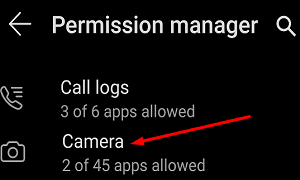
  1. Go to Settings, select Privacy and then go to Permission Manager.
  2. Tap Camera to check which of your apps are allowed to access your photos.android-permissions-manager-camera
  3. If OneDrive is not on the list of allowed apps, go to the Denied section and locate the app.
  4. Select it and check the Allow option.
  5. Check if you can upload multimedia files to OneDrive now.

Log Out of OneDrive

Other users solved the camera upload issues by signing out of OneDrive. Wait for one or two minutes then log back in. Check if the camera upload option is visible now.

OneDrive Can’t Back Up SD Card Photos

OneDrive doesn’t support uploading photos from additional folders (such as screenshots). For example, if you keep your photos on the SD card, gallery sync won’t work on the new OneDrive app versions. Change your photo storage location and check if the issue is gone.

Fix Onedrive Camera Upload Not Working on Samsung Devices

Remove Samsung Account

By the way, if you’re using a Samsung device, try removing your Samsung account from the phone. If you sync the Samsung Gallery app to OneDrive, the camera upload feature is automatically disabled. Removing your Samsung account from Onedrive should solve the problem.

Here are the steps to follow:

  1. On your Samsung device, go to Settings and select Accounts and backup.
  2. Go to Samsung Cloud.
  3. Then tap the three dots and select Settings.
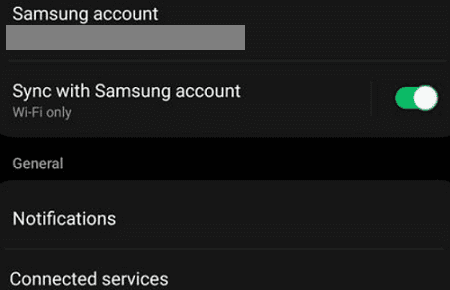
  4. Tap Samsung account, and go to Apps and services.
  5. Select Connected services.samsung-connected-services
  6. Simply remove your Microsoft account (the one you’re using for OneDrive syncing).
  7. Now, go back to OneDrive, tap the Me option, and go to Settings.
  8. The Camera upload should be visible again. Select it and check the results.
  9. But if Camera upload is blank, or the option is grayed out, you need to enter your Microsoft account under Camera upload account. You can then re-enable the Camera upload option.

Enable Media Storage

If you encounter this issue shortly after switching phones, go to Settings, select Accounts and backup, and then Accounts. Select your OneDrive account (connected email), tap Sync Account and enable the Media Storage option.
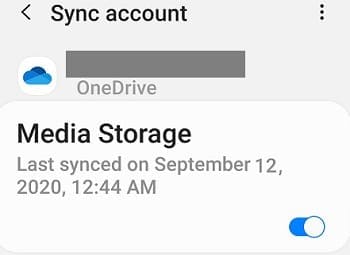
 enable-media-storage-onedrive-samsung


This should let you enable camera upload without necessarily removing your Samsung account. Check your sync settings, if necessary.

Speaking of which, if you’re using Samsung Gallery, keep in mind that the app can only be connected to OneDrive personal accounts.

Relink Microsoft to Samsung Cloud Settings

Other users fixed the problem by unlinking their MS account from Samsung Cloud Settings.

  1. So, go to Samsung Cloud, and tap Settings.
  2. Scroll down to the bottom of the screen where you’ll find the account link.
  3. Then unlink Microsoft, and wait for a few seconds.
  4. Launch Samsung Cloud again and relink the accounts.

For more information about Samsung Gallery and OneDrive, go to Microsoft’s support page.

Reinstall the App

If nothing’s working, uninstall OneDrive and restart your terminal. Then download a fresh copy of the app and check if the issue is gone. Other users said that uninstalling OneDrive app updates and reverting to version 6.16 fixed the issue for them.

Conclusion

If your OneDrive for Android app fails to upload photos from the camera roll, check your OneDrive app settings and ensure the app can access your gallery. If you use a Samsung device, remove your Samsung account from OneDrive. Then go back to OneDrive and enable camera upload.

We hope these solutions helped you troubleshoot the problem. We’re really curious to learn which of these methods worked for you. Do let us know in the comments below.


Tuesday, March 4, 2014

iPhone 6 Leaks: Has Apple's Next Smartphone Already Been Caught On Camera?

It's January, so that means the inevitable rumour machine has already kicked into gear ahead of Apple's next big smartphone announcement. An announcement which, based on previous years, won't actually arrive for another nine months.

Nine months.

Still, that's no reason not to start wading into the inevitably misleading, disappointing and ultimately pointless quagmire of rumours, "leaked" pictures and speculation. Well actually, it is. But just this once we're going to do it anyway.

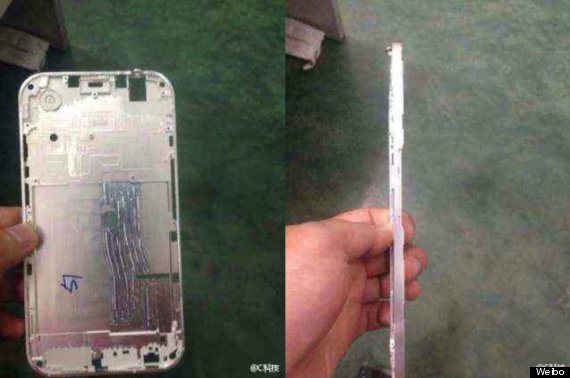
A picture has emerged onlinepurporting to show the new, ultra-thin case of the upcoming iPhone 6. And here it is:

weibo

The pictures were initially posted on Chinese social network Weibo - so could have come from literally anywhere. Basic checks on Google Image search show they are at leastnew, but what that means for their provenance is unclear.

Still, it's virtually a given that the new year will bring at least two new iPhones - a new flagship and a 'C' lower-cost version with last year's specs. It's also possible that variant screen sizes will be involved - though that too is conjecture.

For now just have fun with these pictures, and await the first news about the next-generation of iPhones at either WWDC in June (for iOS 8) and the autumn for the phones themselves.

By: Huffpost.com


Tuesday, January 21, 2014

iOS 7.1 Beta 4 Jailbreak: Apple Closes Evasi0n 7 Exploits In Latest Developer Beta For iPhone 5S And iPad Air

As Apple (NASDAQ:AAPL) released iOS 7.1 beta 4 to developers this week, jailbreakers immediately began wondering whether the security holes and exploits used by the Evasi0n 7 jailbreak had been patched.

While some intrepid users on social news site Reddit created an unofficial version of Evasi0n 7 for iOS 7.1 beta 4, it appears that exploits used by Evasi0n may have been closed, according to user feedback after using the unofficially patched version of Evasi0n 7.


By: ibtimes.com

Wednesday, March 20, 2013

iPhone 5S & iOS 7 Predicted to Deliver Killer Feature Without iPhone 6

The iPhone 5S release will arrive with a killer feature that may be part of iOS 7, according to an analyst who believes such a feature will deliver value to Apple users without the need for an early iPhone 6 release.

Katy Huberty of Morgan Stanley appeared on CNBC’s Fast Money Halftime Report to weigh in on Apple and what the company has planned for the iPhone 5S.

The most interesting part of Huberty’s rundown on Apple is her opinion that Apple will deliver a killer feature for the iPhone 5S not with hardware updates, but by way of an iOS 7 update that could also deliver the new feature to the iPhone 5 and iPhone 4S.

Read: iPhone 5S & iPad 5 Event on June 29th?

Apple is widely expected to deliver the iPhone 5S this year with minimal design and spec updates, which would necessitate a killer iOS 7 feature to headline the show, similar to Siri on the iPhone 4S. While Siri is a love it or hate it iPhone feature, there’s no doubt that it helped fuel excitement and sales of the iPhone 4S. Huberty is the source of the minimal design update rumor as well.

iPhone 5S & iOS 7 Killer Feature
Barron’s reports Huberty’s transcript from the program,

…they own AAPL for innovation. You saw the Samsung [Electronics(005930KS)] Galaxy S4 come out last week, that shows you the innovation cards are up for grabs. What is lacking in that product [the S4] is a killer feature. We think that’s where Apple will surprise this year. This [iPhone] 5S cycle this year will be about a killer feature that drives consumers increasingly to the platform, and that increases the value of those 500 million accounts.

Based on Huberty’s comments, Morgan Stanley’s position is that Apple doesn’t an iPhone 6 this year. Instead the company can count on a software feature that will arrive as part of iOS 7 to deliver enough reason to upgrade. This un-named software feature would also give Apple the ammo it needs to keep the iPhone 5S competitive with the Samsung Galaxy S4.


The iPhone 5S render from Martin Hajek shows what the iPhone 5S mighty look like.
The comment that this feature, “increases the value of those 500 million accounts.” points to a software feature that would arrive on more than just the iPhone 5S. It would be a far stretch to argue that the a new iPhone 5S feature would increase the value of all the other iPhone users if it did not also arrive on some recent devices.

Read: iPhone 6 Concept Brings 4.8-inch, No Home Button Prototype to Life

iOS 7 Overhaul to Deliver the Killer Feature?
The bigger story may be a complete overhaul of iOS 7. In late October 2012, iOS head Scott Forstall resigned, placing the control of iOS and iOS 7 in the hands of Johnny Ive.

Many insiders believe Johnny Ive will dramatically change iOS, cutting out the leather stitching and skeuomorphic design users see throughout iOS 5 and iOS 6 as well as many stock Apple apps.

There is hope that Ive will be able to deliver a radically redesigned iOS 7 that excites users with new looks and features, but this too could be a stretch.

Just as it is tough for Google to deliver a ‘wow’ phone shortly after buying Motorola, Ive is faced with the problem of coming into a major iOS release mid-stream. This may limit what Ive and his following can do with iOS 7. iOS 7 may arrive this summer at WWDC, which is normally where Apple shows off a new version of their software.


It’s possible some of the iOS 7 concepts we’ve seen will come to life to help spruce up iOS 7. But according to iOS Developer Guy English, speaking on the Daring Fireball podcast, iOS 7 won’t be radically different.

iPhone 6 is the Real Killer

iPhone 6 concept from nowhereelse.fr.
The iPhone 6 is arguably the iphone to wait for and offers a much better chance at delivering a killer feature than the iPhone 5S, based on current rumors.

Read: Forget the iPhone 5S, Where’s the iPhone 6?

We’ve heard that the iPhone 6 could feature built-in wireless charging and that a new design could help Apple build in support for items like a larger display, no home button and NFC support.

The downside of Apple’s big-small update cycle is that the ‘S’ version of the iPhone is rarely as exciting as new hardware that comes from something like the rumored iPhone 6 release.


Huberty does not delve into what the possible killer feature may be. It’s not likely the rumored fingerprint reader under the home button, but it could be a mobile wallet app that uses this for added security on the new iPhone. This offers the best hope of a new feature, based on recent rumors, but is an iPhone 5S wallet app and mobile payment support a killer feature?

By: GOTTA BE MOBILE

Wednesday, February 6, 2013

The Complete Guide to unrestricted work Jailbreak for iOS 6


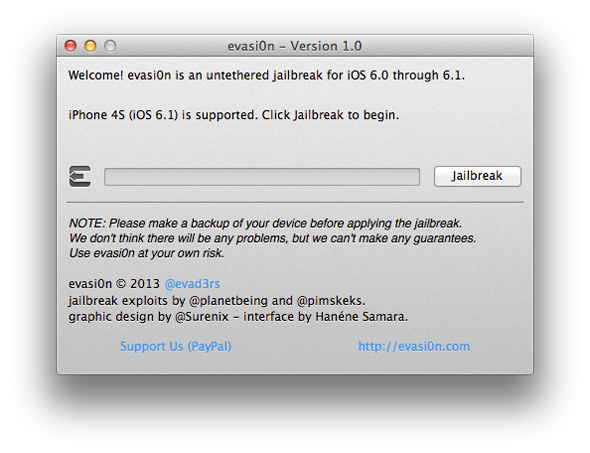
Now, after waiting months since the last Jailbreak is restricted and it was version 5.1.1, announced today the release of the tool Evasi0n which made available Jailbreak has unrestricted system iOS 6.

IMPORTANT NOTE:

Jailbreak new works on devices that bear version iOS 6 and iOS 6.01 and iOS 6.1 (and if you encounter problems preferably doing restore in iTunes using the system files and you can get your file system from this link) - (if your computer does not support the upgrade to iOS 6 and above if this jailbreak is not supported)


1- Load tool Evasi0n (there is a lot of pressure on the server and you may not be able to download the tool today)

2- Unzip the zip file that contains the program Evasi0n.
3- Check to make sure that your computer is no passwords, and if there is password should delete it.
4- Connect your device to your computer by a USB.
5- Take a backup copy of the operating system through iTunes or iCloud then close iTunes.
6- Open tool Evasi0n and of course make sure that your computer is connected to the computer and still Closed iTunes, click on Jailbreak and then wait.
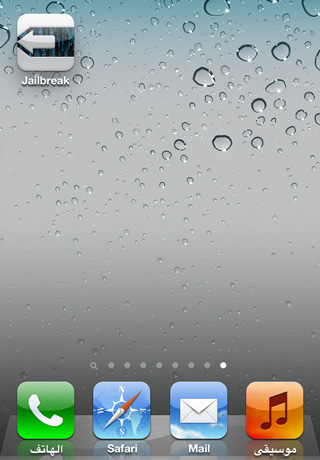
7- the device will be Restart and work more than once, and then evasi0n will ask you open the device and click on the icon that appears on the screen as follows:


8- Congratulations have become Jailbreak your device, you will find Cydia application installed on your iPhone.


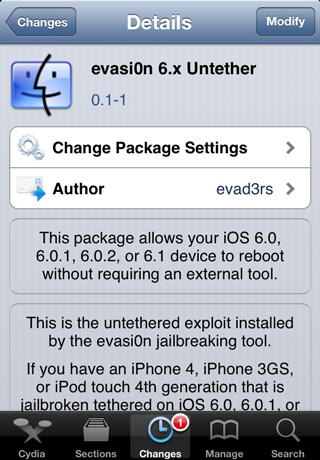
If you jailbreak users unrestricted on the iPhone 4 or 3GS, you can download the following tool from the Cydia jailbreak becomes the device is not restricted :


Watch a video explaining jailbreak:

Friday, January 4, 2013

Apple could launch 'iPhone Mini' next year, analyst says from CNET News

In its ongoing battle against Samsung, Apple may be forced to unveil a smaller, cheaper version of its flagship phone, says Strategy Analytics.


Will the iPhone get a baby brother?
CNET
Is an "iPhone Mini" on the horizon? Strategy Analytics analyst Neil Mawston thinks so. But why?

Samsung has been the clear winner in the smartphone wars, with Apple playing second fiddle. And that lead may wider further in 2013.

Based on data sent to CNET, Mawston expects Samsung to carve out a 33 percent chunk of the smartphone market this year, up from a projected 31 percent in 2012. At the same time, Apple's share will inch up to 21 percent from 20 percent last year. Samsung could sell as many as 290 million smartphones this year, while Apple is likely to sell 180 million iPhones.

The Korean handset maker has the edge over Apple in large part because it "plays in more segments," Mawston told Reuters, allowing it to "capture more volume than Apple."

To fight back, Apple may try to win over a larger base of consumers by launching a smaller, cheaper variant of the iPhone, dubbed the "iPhone Mini" by the analyst.

With the iPhone 5 grabbing huge demand and sales, a low-end model may not be on Apple's agenda this year. But Mawston told CNET he thinks it's coming.

We believe Apple will have to launch an 'iPhone Mini' at some point over the next three years to address the hundreds of millions of prepaid users worldwide that cannot afford the current iPhone. The iPhone 5 is growing fast and profitably right now, so there is limited incentive for Apple to launch a profit-squeezing 'iPhone Mini' this year. We expect the 'iPhone Mini' to be more likely next year, in 2014, when Apple's penetration of the global postpaid smartphone market will be nearing saturation and Apple will be forced to discover fresh growth streams elsewhere.
Jefferies analyst Peter Misek also sees a low-cost iPhone in Apple's future but thinks it could launch early this summer at a price of $200 to $250. He cautions that a low-end iPhone hasn't gotten the go-ahead yet because Apple feels such a Apple iPhone 5product would bite into gross margins.

Wednesday, January 2, 2013

Apple testing new iPhone, iOS 7: report from Reuters

(Reuters) - Apple Inc has started testing a new iPhone and the next version of its iOS software, news website The Next Web reported.

The company's shares rose as much as 4.3 percent but eased a little to trade up 3 percent at $546.11 by mid-day on the Nasdaq.

Application developers have found in their app usage logs references to a new iPhone identifier, iPhone 6.1, running iOS 7 operating system, the website reported.

Apple's iPhone 5 bears the identifiers "iPhone 5.1" and "iPhone 5.2" and is powered by the iOS 6 operating system.

Developer logs show that the app requests originate from an internet address on Apple's Cupertino campus, suggesting that Apple engineers are testing compatibility for some of the popular apps, the website said.

"Although OS and device data can be faked, the unique IP footprint leading back to Apple's Cupertino campus leads us to believe this is not one of those attempts," the website said.

Raymond James analyst Tavis McCourt, however, expects the next version of the iconic smartphone to be called iPhone 5S and not iPhone 6.

Apple typically tags the interim version of its phones with an "S" before moving on to a new version. iPhone 3GS followed iPhone 3G and the iPhone 4S followed iPhone 4.

McCourt also said he wouldn't be surprised if Apple looked at an earlier launch because of the stress on its supply chain caused by late-year launches.

Apple launched iPhone 5 in September and it has been reported that the new iPhone will be released in the middle of 2013.

Techradar.com reported last month that Apple could unveil the next version of its iPhone as early as the spring of 2013.

(Reporting by Supantha Mukherjee and Chandni Doulatramani in Bangalore; Editing by Saumyadeb Chakrabarty)