More and more offices and schools block favorite social networking sites like Facebook, Orkut, Myspace, Bebo and so on using web filters and firewalls. There are a several ways to get around the firewall or web filter run by your corporate office or schools. One of the methods you can do to unblock websites at schools, At work or in countries such as Iran, Saudi Arabia, Kuwait, United Arab Emirates where Goverments impose internet censorship is using tunneling software. Well, there are a bunch of them, but this time I will discuss a very handy application that lets you circumvent restrictive web filters and unblock website
JAP / JonDo enabled its users to unblock websites and stay anonymous on the internet by giving access to strong anonymization systems. It hides the users IP address from internet site operators, network administrators , intelligence agencies and even the operators of the accessed anonymization systems.Each application that should be anonymized has to be configured separately for using JAP / JonDo.
Unblock website with JAP/JONDO, Step-by-Step Guide
Step one : Download and install JAP/Jondo you can download its installer here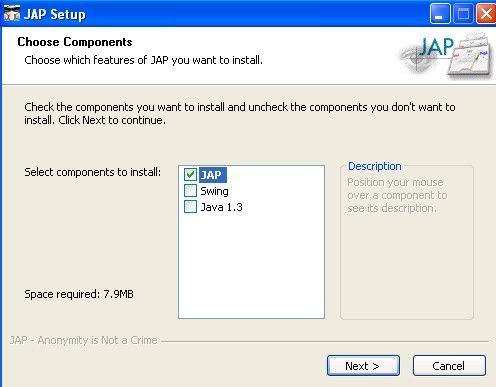
Step two: Skip the Setup Wizard and Configure JAP by clicking on configure button:
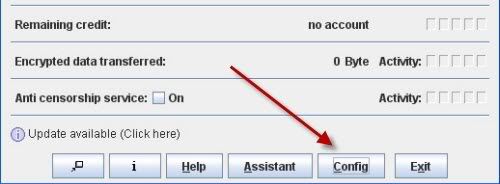
Step Three : Configure “Network” by putting proxy , port and authentication details (if you have to login to proxy with username) if you are accessing the internet behind a company or school, leave it unchanged it you are connecting to the web directly. Set the proxy type to Http/Https as most web servers use this proxy type unless you’re behind other types of proxy such as SOCK proxy.

Step Four : Choose JAP anonymity services by clicking on “Anonymity” “Reload” button respectively and then click on the dropdown menu under “JonDonym”, select the services type you want to connect to as shown in the picture bellow:
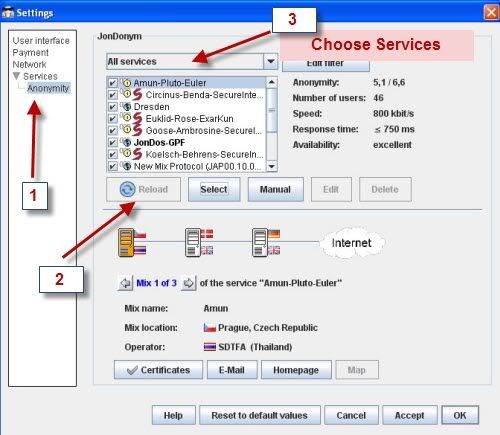
There are basically three types of services to choose from to unblock websites with JAP : free service , premium service, customized services (services added by you) and custom Filter.
Now suppose that you choose to use Free service select the “Free Service” and next select from the dropdown menu the free services that you can connect to , select one that is available as shown bellow:
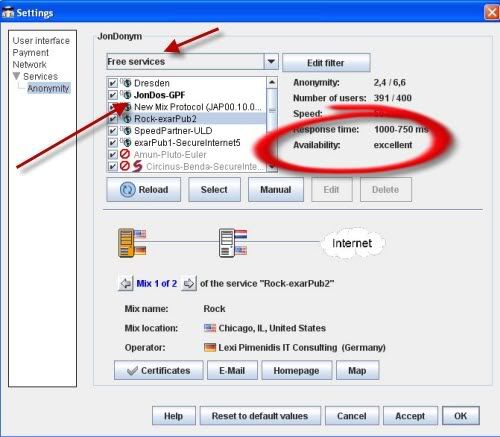
Step Five : Click on the OK Button, now you’re connected to JAP free services server , don’t forget to set anonymity to “on” :
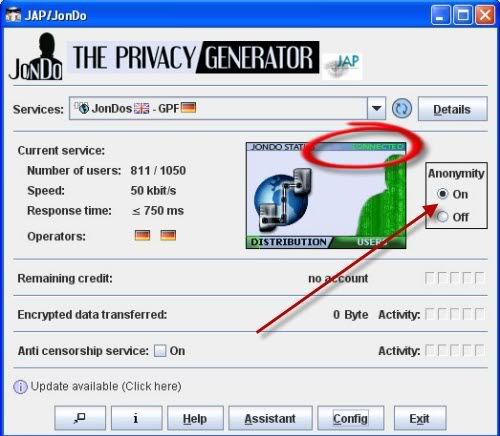
Final step : Now you have connected to the JAP server bypassing your local proxy/ firewall, the final step is to configure your browser and application to use the following proxy and port to unblock websites you wish to surf:
Proxy : 127.0.0.1
Port : 4001
see the following screenshot to see browser settings :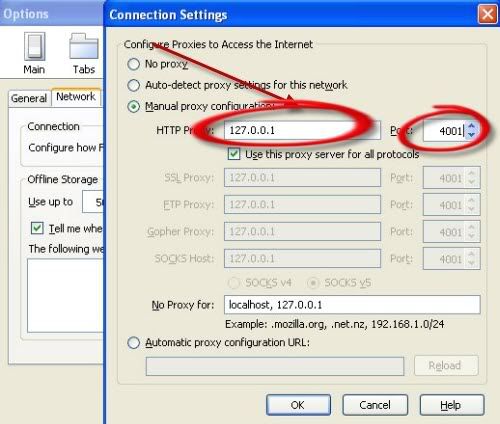
That’s all you can now get around firewall to surf the web anonymously and unblock websites easily

No comments:
Post a Comment